
Build a store health report in Slack
Ask Athena for a new daily Slack report. In the walkthrough she builds Store Health 2.0, with conversion rate on a 30-day chart, the day's errors and checkout drop-off, notes for launches and site changes, and landing-page tests proposed from Clarity.
On this page
A new Slack report is a common request for Athena: she writes the job, posts a sample for review and puts the report on a schedule. In this walkthrough she builds Store Health 2.0 for Harbor & Pine, a daily card laid out like the Meta optimizer's cards. Each card shows:
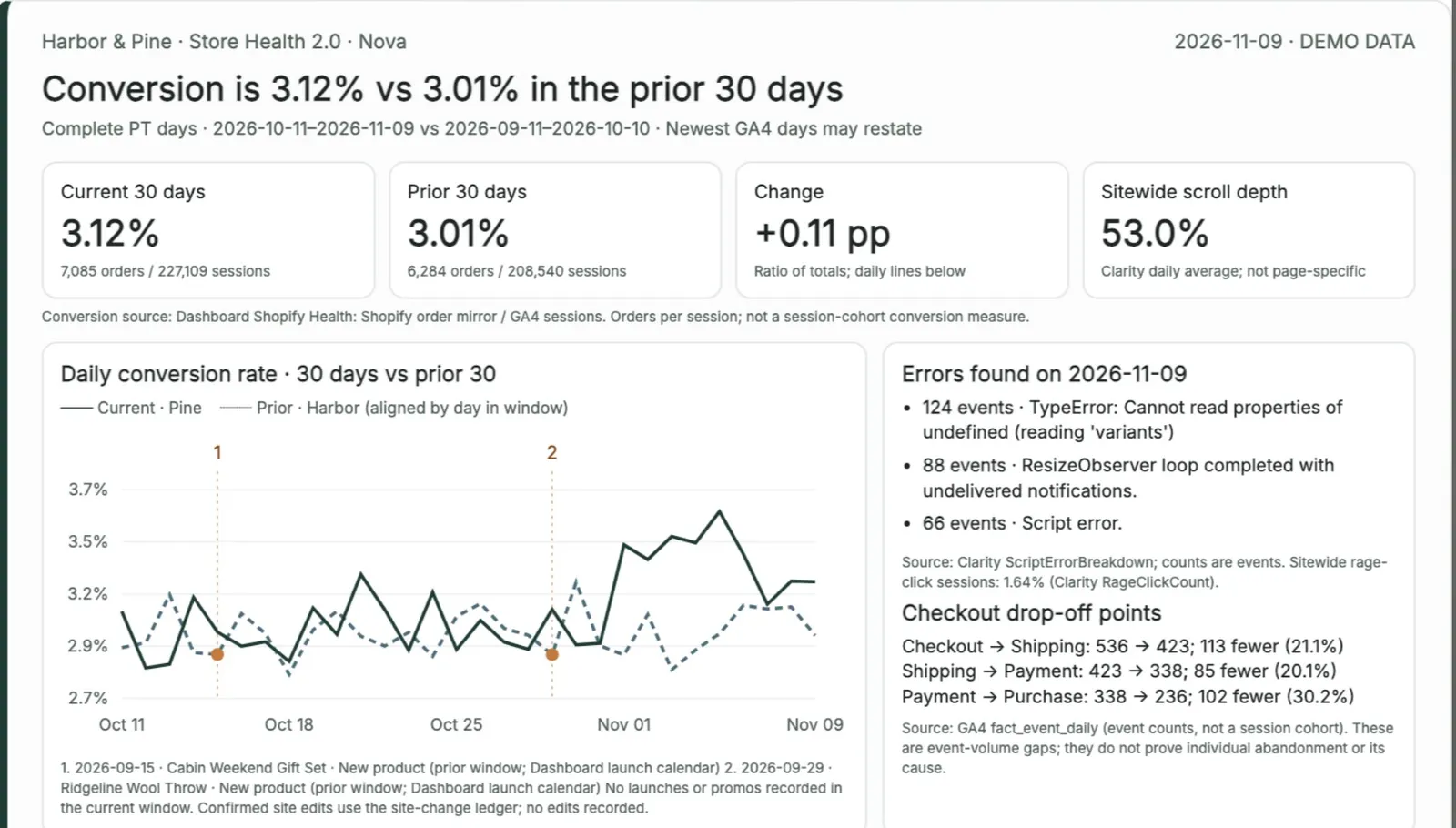
conversion rate on a 30-day chart against the prior 30 days
the day's key errors and the checkout steps where shoppers drop off
numbered notes on the chart for launches, promotions and site changes
one or two proposed tests for the landing pages with the most Meta spend, based on what Clarity shows
The tests are proposals for a person to review. The report does not change the site.
 3. Build a new Slack report
Before you ask#
Find the report you want the new one to look like. The demo request points to the channel where the Meta optimizer posts its cards. You can also link one card: hover over it, open More actions (the three dots) and choose Copy link.
Decide which conversion rate the report shows. Store Health 2.0 uses Shopify orders divided by GA4 sessions, and the card says so. Naming one definition keeps the chart from mixing measures.
Decide where the report posts and when.
Ask Athena#
Open #gd-athena-engineering, tag @Athena and describe the report: its name and brand, the report to copy, what each card shows, where the numbers come from, and how you will check it. The request from the demo:
@Athena build Store Health 2.0 for Harbor & Pine, laid out like Mandy's optimizer cards in #mandy-meta-optimizations. Each daily card should show:
- conversion rate on a 30-day chart against the prior 30 days
- the key errors and checkout drop-off points found that day
- annotations on the chart for site changes and other big updates (launches, promos, theme edits)
- one or two proposed landing-page tests for the top-spending Meta landing pages, based on what Clarity shows (rage clicks, dead clicks, scroll depth)
Use Harbor & Pine's demo data and name the source of every number. Post one sample card in this thread for review, then schedule it for 8:00 AM PT daily in #harborpine-reports.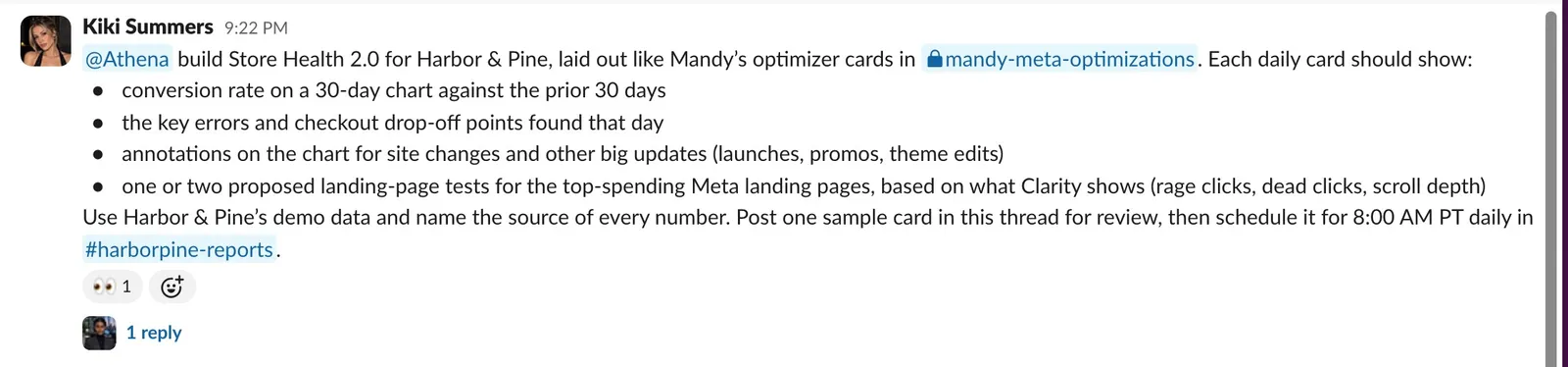
The Store Health 2.0 request, pointing Athena to the Meta optimizer's cards in #mandy-meta-optimizations. Send it. Athena replies in a thread under your request. Her status message shows the model, the command she is running and running counts, and it updates as she works.
Follow the build#
Each test run gets its own reply, and her notes explain the choices she makes about the data. Store Health 2.0 took 20 minutes, 68 commands and 4 test runs, all passing.
To add detail, reply in the thread and tag her, for example to say which landing pages count.
Check the sample card#
The sample card posts in the thread as Nova, the agent that runs the daily reports. Check it against your request:
the chart shows the conversion rate you named, for the right periods
the errors and drop-off steps are specific enough to act on
the numbered notes sit on the right dates
each proposed test names the page, the change to try and the Clarity finding behind it
every number names its source
The sample card: conversion is 3.12% against 3.01% in the prior 30 days, from Shopify orders and GA4 sessions, and the two numbered markers on the chart are product launches. Beside the chart are the day's errors from Clarity and the drop between checkout steps from GA4. 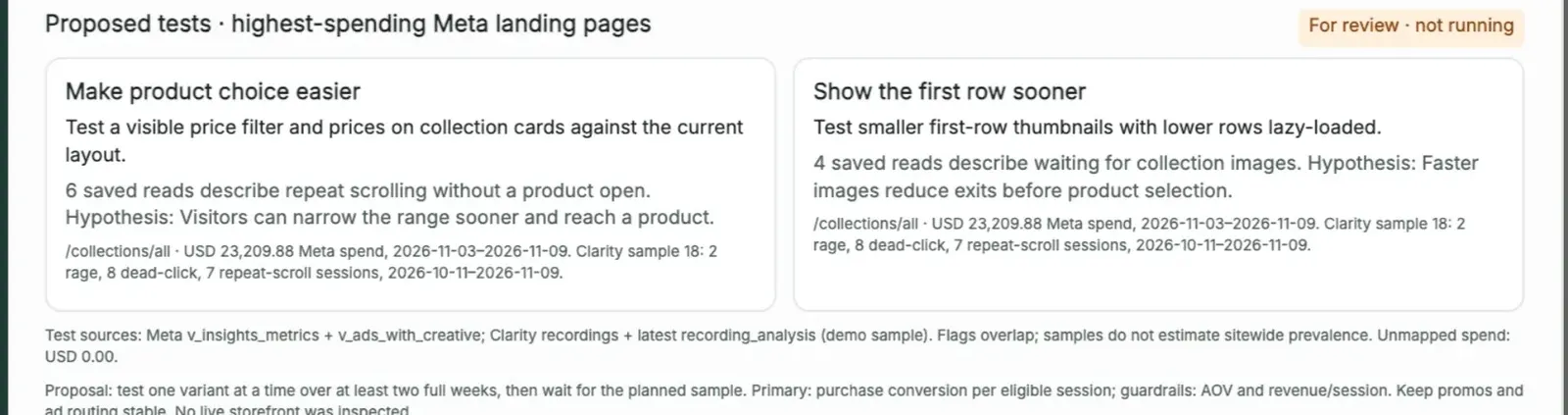
Two proposed tests for the landing page with the most Meta spend, marked “For review · not running”, each with the page, its Meta spend and the Clarity sessions behind it. Read her answer. It links the sample and confirms the schedule: Store Health 2.0 replaced the existing daily store-health report at 8:00 AM Pacific in #harborpine-reports, starting the next morning. She shipped it as a commit on the machine, the way that machine ships changes; there was no pull request.
She set the schedule in the same task, right after the sample, because the request asked for both. If the card needs changes, reply in the thread and tag her. If you would rather approve the sample before it goes on the schedule, say so in the request, for example "wait for my OK before you schedule it".
Related
- Getting started with AthenaAthena is the engineer in your Slack. Ask her to fix a report that errored or to build a new report, dashboard or agent, and follow the work in one Slack thread.
- Build a KPI dashboard for your teamAsk Athena for a dashboard your team checks every day. In the walkthrough she adds Organic social and Paid tabs to Harbor & Pine's brand dashboard, behind its sign-in, with every source and date range labeled.
- Fix a scheduled report that erroredWhen a scheduled report fails, paste the link to the agent's error message into #gd-athena-engineering. Athena finds the cause, fixes it, runs the tests and reruns the report so you can see it post.
- Create a new agentAsk Athena for a new AI employee in one message. In the walkthrough she builds Juno, a briefing assistant, with a portrait, her own Slack app, an access list and a page on the dashboard, then Juno answers questions in Slack.
Still stuck?
Email the Growth Dept team. Say which workspace you work in and what you were trying to do.