
Build a KPI dashboard for your team
Ask Athena for a dashboard your team checks every day. In the walkthrough she adds Organic social and Paid tabs to Harbor & Pine's brand dashboard, behind its sign-in, with every source and date range labeled.
On this page
Athena also builds dashboards. In this walkthrough she adds two tabs to Harbor & Pine's brand dashboard, behind the sign-in the team already uses:
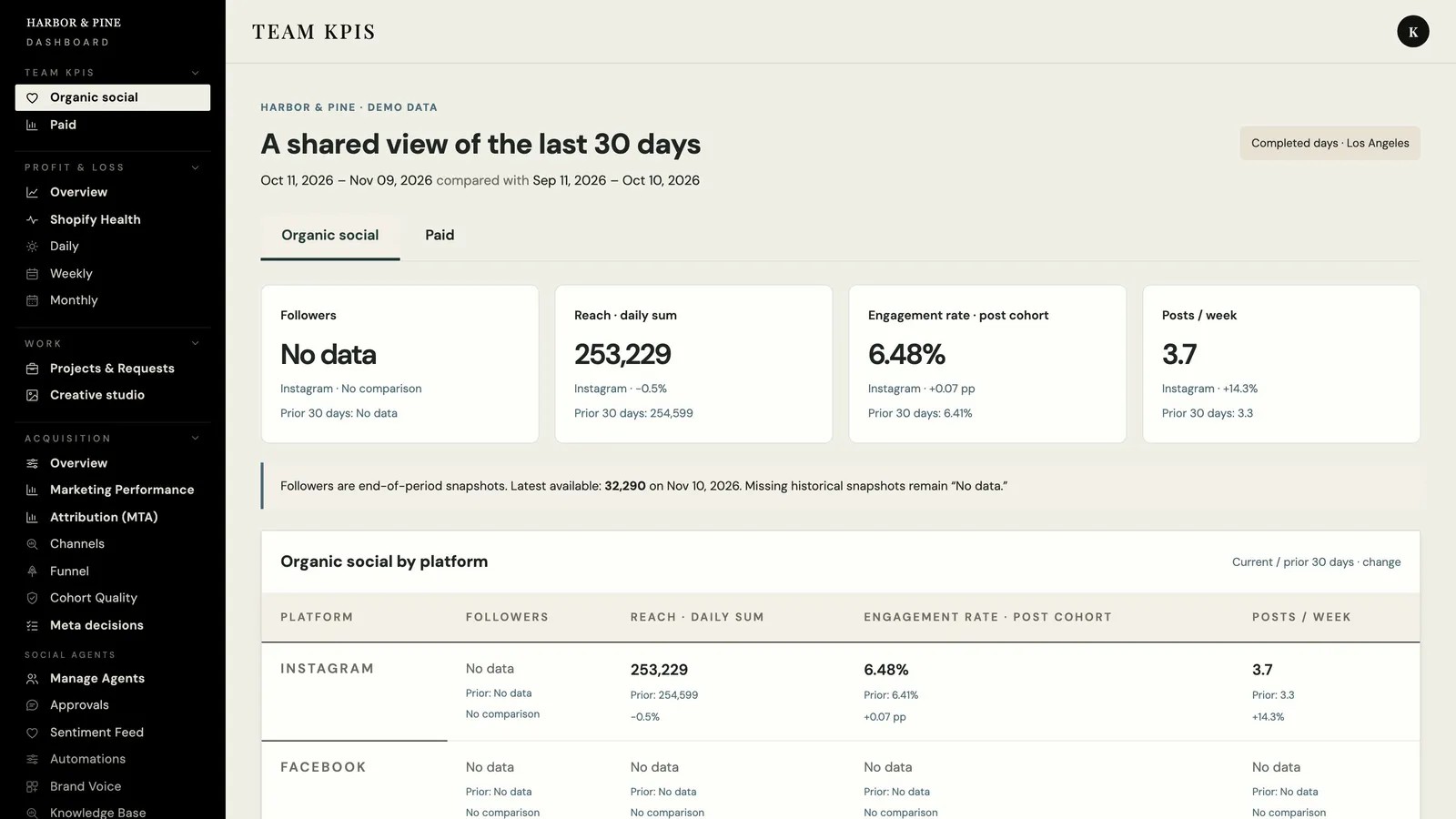
Organic social: followers, reach, engagement rate and posts per week by platform, for the last 30 days against the prior 30.
Paid: spend, ROAS, CTR and store profit by platform (Meta, Google, TikTok and Snapchat), with ROAS on Growth Dept MTA's 7-day-click model and store profit from the P&L.
She built it in 15 minutes.
 5. Build a KPI dashboard for your team
Ask Athena#
Open #gd-athena-engineering.
Tag @Athena and describe the dashboard: where it lives, the tabs and what each one shows, the data to use, and what to do where a source is missing. The request from the demo:
@Athena build a KPI dashboard for the Harbor & Pine team inside the brand dashboard, behind its existing sign-in, with two tabs:
1. Organic social: followers, reach, engagement rate and posts per week by platform, last 30 days against the prior 30.
2. Paid: spend, ROAS, CTR and store profit by platform (Meta, Google, TikTok, Snapchat) on the Northbeam-style 7-day-click model from Growth Dept MTA, with store profit from the P&L.
Use Harbor & Pine's demo data, label every source and date range, and show "no data" rather than zero where a source is missing. Send me the link and a screenshot when it's live.
The KPI dashboard request, with the two tabs as a numbered list. Send it. Athena's status message appears in the thread and updates as she works.
Follow the build#
Early on she checks the data and says what is missing. In the demo that was a single follower snapshot, no data for the other organic platforms, and no click counts for CTR. She keeps those gaps visible on the page instead of filling them in.
Each test run gets its own reply. One run failed while she was still writing the tests; the five after it passed.
When the pages are live, she posts a screenshot of each tab in the thread, then her answer with the link.
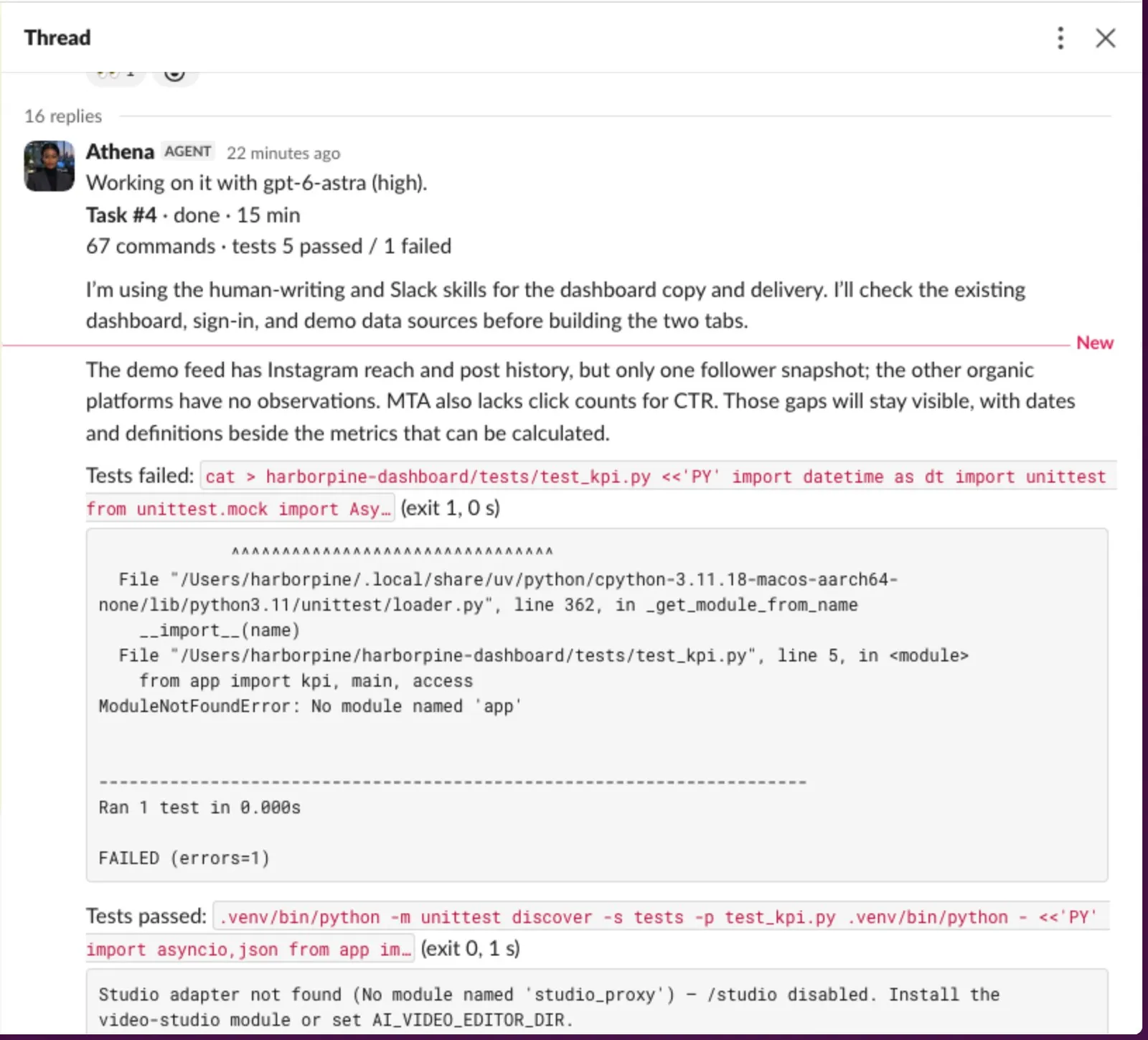
Athena's thread: her status (done in 15 minutes), her note on the gaps in the demo data, a test run that failed while she wrote the tests and the passing run after it.
Check the dashboard#
Open the link from her answer and sign in.
Check the Paid tab. Pick one platform and compare its spend with the platform's own ads manager for the same dates. The ROAS column names its model, and store profit comes from the P&L. In the demo, CTR and platform profit read "No data" because the demo has no click counts and the P&L does not split profit by platform. Snapchat has no data in the demo either.
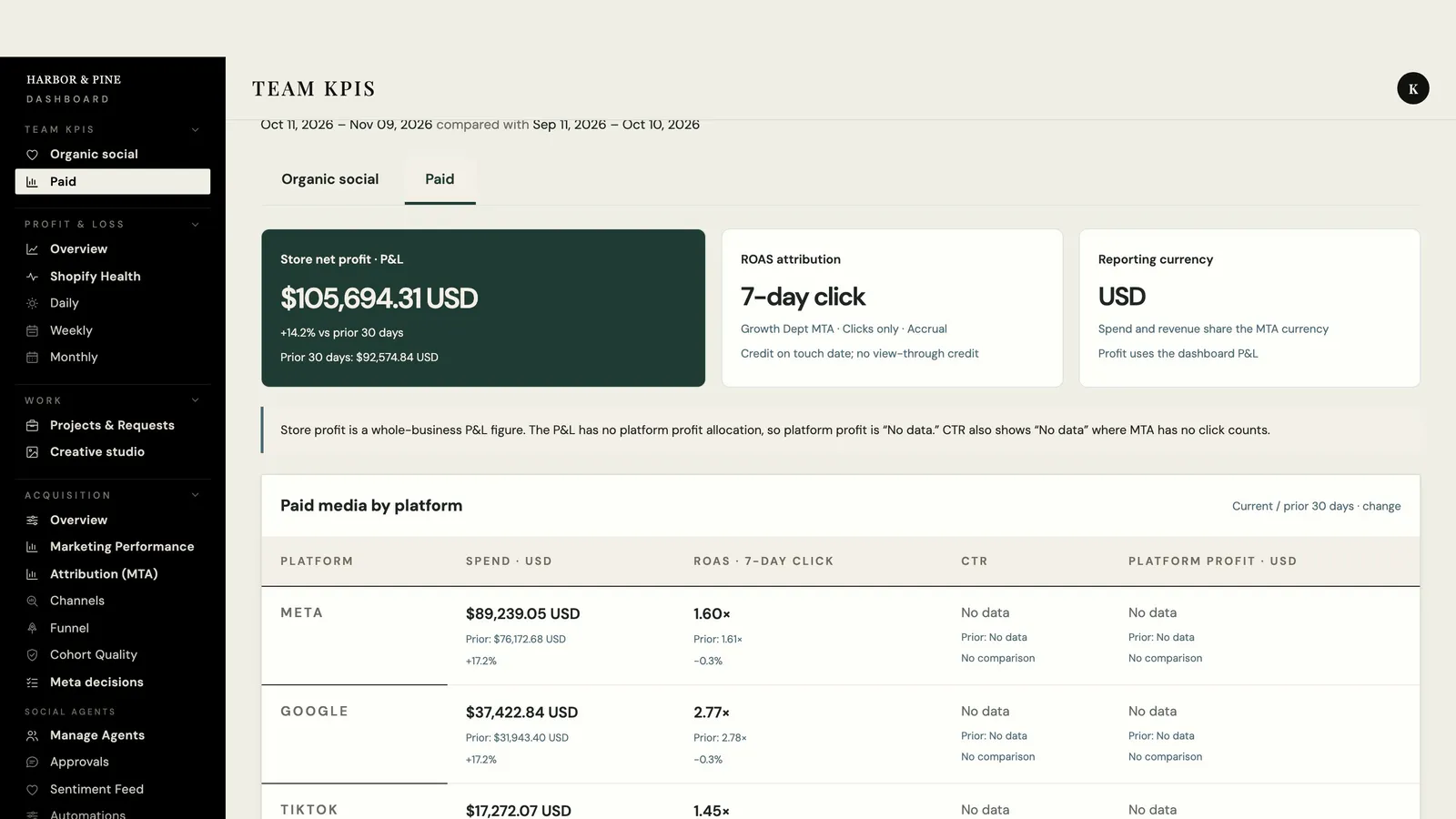
The Paid tab: store profit from the P&L, ROAS on the MTA's 7-day-click model, and spend, ROAS, CTR and platform profit by platform. CTR and platform profit read “No data”. Check the Organic social tab with someone from the social team. In the demo only Instagram has data; the other platforms say "No data" rather than zero. Followers read "No data" too, because one snapshot gives nothing to compare.
The Organic social tab: followers, reach, engagement rate and posts per week, last 30 days against the prior 30. Only Instagram has data in the demo. At the bottom of each tab, check the sources, definitions and the dates the data was refreshed.
Open the link in a private browser window and check that it asks you to sign in.
Related
- Getting started with AthenaAthena is the engineer in your Slack. Ask her to fix a report that errored or to build a new report, dashboard or agent, and follow the work in one Slack thread.
- Build a store health report in SlackAsk Athena for a new daily Slack report. In the walkthrough she builds Store Health 2.0, with conversion rate on a 30-day chart, the day's errors and checkout drop-off, notes for launches and site changes, and landing-page tests proposed from Clarity.
- Create a new agentAsk Athena for a new AI employee in one message. In the walkthrough she builds Juno, a briefing assistant, with a portrait, her own Slack app, an access list and a page on the dashboard, then Juno answers questions in Slack.
- Fix a scheduled report that erroredWhen a scheduled report fails, paste the link to the agent's error message into #gd-athena-engineering. Athena finds the cause, fixes it, runs the tests and reruns the report so you can see it post.
Still stuck?
Email the Growth Dept team. Say which workspace you work in and what you were trying to do.